Comparison
Kantesti vs Perplexity
Editorial scores 9.4 vs 5.6 out of 10, compared criterion by criterion.
Perplexity is the tool in our comparison for researching one marker: ask what a result can mean and it answers with linked sources you can check. It is built for search-style answers, not for interpreting your whole report, so use it to read the evidence and something else for the report.
Ranked #5 of 5Editorial score out of 10
Editorial disclosureWe openly recommend Kantesti and rank it first. Every tool, Kantesti included, is scored on the same 13 published criteria and weights in our methodology; read our editorial policy.
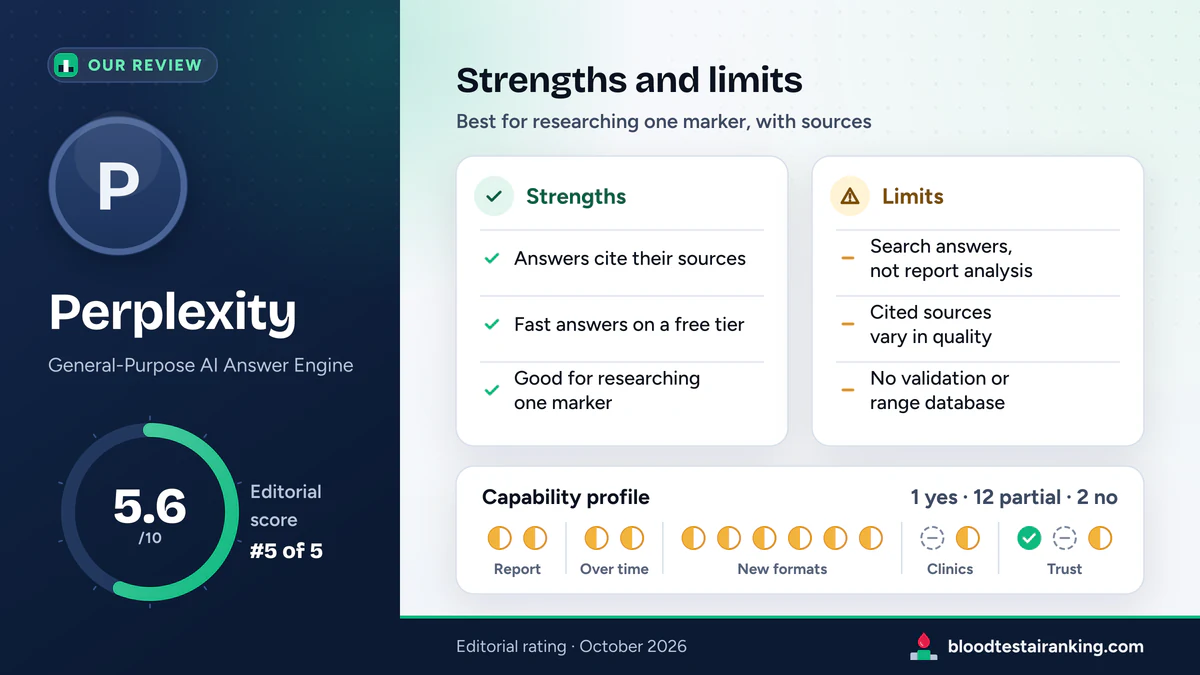
A strong research companion (5.6/10): use it to read about a marker, not to interpret the report. For the report itself Kantesti is our pick, and for decisions, your clinician.
Perplexity is an AI answer engine that pairs frontier language models with live web search and shows its sources. That makes it the most useful tool in our comparison for looking up what a marker such as ferritin or ALT means and checking the evidence yourself. It is less suited to interpreting your whole personal report: it is built for search-style answers, and we found no blood-test-specific clinical validation, structured reference-range database or lab-report modules.
Vendor figures are company-reported and cover every use of Perplexity, not blood tests in particular. Prices are approximate, in US dollars, as of October 2026.
How Perplexity does on the 15 capabilities we check for blood test use. Its Partial rows lean on research with citations rather than on working with your own report. Tally: 1 yes, 12 partial, 2 no, which gives a capability coverage of 4.7 out of 10 (Kantesti: 10.0).
How to read it. Yes = a dedicated, documented feature that works on your lab data. Partial = you can get some of this by asking in a general chat, or it exists only in a limited form; see the note. No = we found no such feature and no practical way to get it. Scoring: yes = 1, partial = 0.5, no = 0; capability coverage = 10 × points / 15.
Perplexity across the 15 capabilities in our matrix, reviewed October 2026. Partial means you can get some of it by asking in a chat; the note says how.
Perplexity is at its best with one specific question. Say your ferritin is above the printed range but your CRP is normal. A good question is specific, asks for sources and asks for limits:
A research question you can adapt“What can cause a raised ferritin with a normal CRP? Cite clinical guidelines or review articles, say which causes need a doctor's attention, and tell me what you cannot know without my full results.”
Then read the answer the way you would read a news story. Open two or three of the cited sources, check that they say what the summary says, and look at their dates. Ferritin shows why context matters: it reflects iron stores but can also rise for other reasons, so a single value rarely tells the whole story. Take the list of questions, not a conclusion, to your doctor.
Perplexity shows where each sentence came from, which is its biggest strength. Use the citations to judge how much weight an answer can bear, from strongest to weakest:
If the key claim rests only on the bottom two rungs, treat it as a lead to ask about, not as an answer. A citation shows where a sentence came from; it does not show that the source is right, or that the summary read it correctly.
Perplexity is designed to search, then summarise. Upload a whole report and it can summarise that too, but it does not map each value to your lab's ranges, track markers across reports or produce a structured interpretation. Its strength can even get in the way: a general range from a web page can quietly replace the range printed on your report unless you tell it to use only the printed ones.
That is why Perplexity has the lowest score in our ranking (5.6) even though it is the best of the five for checking evidence. Our criteria reward tools that read your report; Perplexity is built to read the web.
Perplexity Pro lets you choose which model writes the answer, from several frontier models from other providers and Perplexity's own Sonar models [2]. For blood test questions the choice matters less than the sources: every option is a general-purpose model, none is validated for lab reports, and the citations are the part you can check. Pick one, keep it for the whole thread, and compare models only on specific factual points.
Check Perplexity's data settings before uploading anything: whether your questions may be used to improve its models, how long uploaded files are kept and how to delete threads [1]. It is not a HIPAA-covered service. Research questions about a marker do not need your report at all, so ask in general terms and keep your personal details out.
Citations show where a general claim came from; they do not show how well a tool reads your report. For that, Kantesti's Clinical Validation Framework sets out its method and results.
The two tools do different jobs, and they work well together: interpret the report in Kantesti, research any marker that worries you in Perplexity, and decide with your doctor. Supplements are a good example. Perplexity summarises the evidence on a supplement with citations; Kantesti's Supplement Advisor builds a plan from your own DNA, blood and questionnaire data, drawn from a clinic's product range, so ask about alternatives.
Read the full head-to-head in Kantesti vs Perplexity, criterion by criterion, our Kantesti review, or the rankings of all five tools.
Twelve criteria carry 7% each and the capability coverage axis carries 16%, the same weights for every tool (see the score breakdown in our methodology). Perplexity's weighted total is 5.58, published as 5.6/10, ranked #5 of 5 in our AI blood test rankings.
| Criterion | Weight | Sub-score | Points | Why |
|---|---|---|---|---|
| User base and market proof | 7% | 6 | 0.420 | 30M+ users and about 780M queries a month (company-reported, 2025): the smallest audience of the four assistants. |
| Language support | 7% | 5 | 0.350 | Interface in 20+ languages; answers in many more. |
| Analysis speed | 7% | 10 | 0.700 | The fastest answers in our comparison, usually within seconds. |
| Accuracy and clinical validation | 7% | 3 | 0.210 | No blood-test validation found, and answers depend on third-party models and web sources of variable quality. |
| Mobile accessibility | 7% | 10 | 0.700 | Web, iOS and Android apps with voice mode. |
| Free plan | 7% | 8 | 0.560 | A free tier with limited Pro searches; file uploads are more generous on Pro. |
| API and developer access | 7% | 6 | 0.420 | The Sonar API returns search-grounded answers; no lab-report endpoints. |
| B2B and lab integration | 7% | 2 | 0.140 | No white-label product or integration for clinics or labs. |
| Global pricing | 7% | 4 | 0.280 | Priced mainly in US dollars; we found no locally set prices. |
| Payment methods | 7% | 4 | 0.280 | Mainly cards. |
| Certifications and compliance | 7% | 5 | 0.350 | SOC 2 and GDPR programmes; not HIPAA-covered. |
| Technology | 7% | 6 | 0.420 | Strong retrieval and citations on top of other providers' models; built for search, not for lab data. |
| Capability coverage (new, October 2026) | 16% | 4.7 | 0.752 | 1 yes, 12 partial and 2 no across the 15 capabilities: 7 points out of 15. |
| Weighted total | 100% | 5.58 | Rounded to one decimal: 5.6/10, the score published on every page. |
Swipe sideways to see the whole table.
Researching a marker is low-risk; acting on what you read is where these rules matter. The same checklist, illustrated, is on our home page safety guide.
It can summarise an uploaded report, but it is built for search-style answers, not for interpreting a whole report against your lab's ranges. Use it to research a specific marker with sources, and use a dedicated analyzer or your clinician for the report itself.
They vary. Each answer links its sources, so you can check them: clinical guidelines and peer-reviewed reviews deserve the most weight, forums and shops the least. A summary can also misread a good source, so open the key citations yourself.
File uploads are limited on the free tier. Pro (about $20 a month as of October 2026) adds more uploads, more Pro searches and a choice of models. Limits change, so check Perplexity's plan page.
Perplexity when you want to see the evidence behind an answer; ChatGPT when you want your own numbers explained conversationally. In our ranking ChatGPT scores 6.8 and Perplexity 5.6, mainly because ChatGPT does more with your actual report.
They do different jobs. Kantesti interprets your whole report against lab-specific ranges, with published validation (9.4); Perplexity researches one marker with citations (5.6). Use Kantesti for the report and Perplexity to read the evidence behind it.
Vendor pages we checked in October 2026 for the Perplexity facts on this page, and the validation document we cite for Kantesti.
Perplexity against Kantesti and against each of the other assistants, each page with its own angle.
Editorial scores 9.4 vs 5.6 out of 10, compared criterion by criterion.
Editorial scores 6.8 vs 5.6 out of 10, compared criterion by criterion.
Editorial scores 6.4 vs 5.6 out of 10, compared criterion by criterion.
Editorial scores 6.2 vs 5.6 out of 10, compared criterion by criterion.