Comparison
Kantesti vs Gemini
Editorial scores 9.4 vs 6.4 out of 10, compared criterion by criterion.
Gemini can take a long, multi-page report in one go and explain it in plain language, and on Android it is already on your phone. It is a capable general assistant, not a lab-report engine: the numbers it transcribes and the ranges it uses still need checking against your report.
Ranked #3 of 5Editorial score out of 10
Editorial disclosureWe openly recommend Kantesti and rank it first. Every tool, Kantesti included, is scored on the same 13 published criteria and weights in our methodology; read our editorial policy.
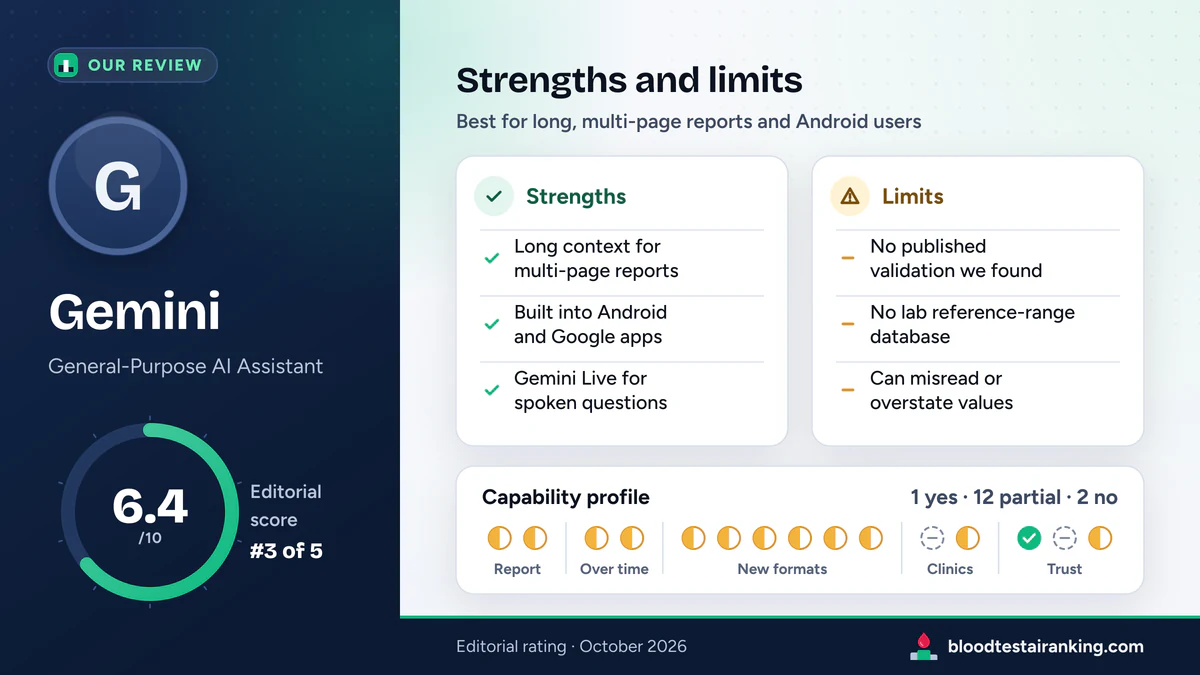
A capable, well-integrated explainer for long reports (6.4/10), especially on Android. For a validated, structured interpretation, Kantesti remains our pick.
Gemini is Google's general-purpose assistant. Its long context window lets you load a multi-page report, or several reports, in one go, and Gemini Live can talk the results through. The consumer Gemini app is not a medical product: we found no blood-test-specific clinical validation (Google's Med-PaLM and Med-Gemini research models are separate from it), no structured reference-range database and no lab-report modules, so treat its output as an explanation to check, not a diagnosis.
Vendor figures are company-reported and cover every use of Gemini, not blood tests in particular. Prices are approximate, in US dollars, as of October 2026.
How Gemini does on the 15 capabilities we check for blood test use. Its long context window makes several Partial rows more practical than in other chats, but none becomes a dedicated feature. Tally: 1 yes, 12 partial, 2 no, which gives a capability coverage of 4.7 out of 10 (Kantesti: 10.0).
How to read it. Yes = a dedicated, documented feature that works on your lab data. Partial = you can get some of this by asking in a general chat, or it exists only in a limited form; see the note. No = we found no such feature and no practical way to get it. Scoring: yes = 1, partial = 0.5, no = 0; capability coverage = 10 × points / 15.
Gemini across the 15 capabilities in our matrix, reviewed October 2026. Partial means you can get some of it by asking in a chat; the note says how.
Gemini can hold a lot of text in a single conversation. You can upload a ten-page panel, or this year's report next to last year's, without splitting it into pieces, and ask questions about the whole thing. For people who receive long hospital printouts, that is a real convenience over pasting values one screen at a time.
Three things a long context window does not change:
On many Android phones Gemini is the built-in assistant, so you can share a PDF or a photo of a report straight from your files or camera, and the iOS app and the web version work the same way. Gemini Live lets you talk the results through by voice, which some people find easier than reading a dense explanation.
Two cautions. A voice conversation is harder to check than text, so afterwards ask for a written table of the values it used. And a report shared from your phone is covered by the same Gemini Apps Activity setting as a typed chat (see privacy, below).
Google has published research on medical versions of its models, including Med-PaLM and Med-Gemini, and its papers report strong results on medical benchmarks [3]. Those are research models evaluated by Google's researchers. They are not the consumer Gemini app on your phone, and we found no published clinical validation of the consumer app for blood test interpretation. Read headlines about Med-Gemini as news about Google's research, not as evidence about the answer you get in the app.
Before you upload a report, read Google's Gemini Apps privacy hub [1] and check the Gemini Apps Activity setting, which controls whether your conversations are kept with your Google Account. Google also explains that some conversations may be reviewed by trained people to improve its services, and advises against entering confidential information you would not want a reviewer to see. A blood test with your name on it is exactly that kind of information.
The trick with a long-context assistant is to make it show its transcription before it explains anything, and to keep it on your lab's ranges rather than ranges from the web:
A prompt you can copy“Here is my blood test [attach the de-identified report]. First, list every test name, value, unit and reference range exactly as printed, in a table. Use only the ranges printed on my report; if a range is missing, say so instead of supplying one. Then, for each value outside its printed range, explain in plain language what it measures and common non-urgent reasons it can be off, and list questions I should ask my doctor.”
Where Gemini gives a capable general explanation, Kantesti maps each value to lab-specific ranges, and its approach is documented in a published Clinical Validation Framework.
The difference shows most with years of results. Kantesti's Trend Analysis lines up each marker across your reports; Gemini compares whatever you load into one conversation, as free-form text. Gemini also has no built-in body map or blood-age estimate. It can approximate either if you ask, but the result depends on the chat, not on a fixed method.
Read the full head-to-head in Kantesti vs Gemini, criterion by criterion, our Kantesti review, or the rankings of all five tools.
Twelve criteria carry 7% each and the capability coverage axis carries 16%, the same weights for every tool (see the score breakdown in our methodology). Gemini's weighted total is 6.42, published as 6.4/10, ranked #3 of 5 in our AI blood test rankings.
| Criterion | Weight | Sub-score | Points | Why |
|---|---|---|---|---|
| User base and market proof | 7% | 8 | 0.560 | 450M+ monthly users (company-reported, mid-2025), behind ChatGPT's figure in our data. |
| Language support | 7% | 7 | 0.490 | Available in 45+ languages: wide, but fewer than ChatGPT or Kantesti. |
| Analysis speed | 7% | 9 | 0.630 | Answers in seconds to about a minute, including long uploads. |
| Accuracy and clinical validation | 7% | 4 | 0.280 | We found no published validation of the consumer app for blood tests; Med-Gemini research does not apply to the app. |
| Mobile accessibility | 7% | 10 | 0.700 | Built into Android, with an iOS app, the web version and Gemini Live voice. |
| Free plan | 7% | 9 | 0.630 | A generous free tier that accepts uploads within usage limits. |
| API and developer access | 7% | 7 | 0.490 | The Gemini API is general-purpose; integrators can combine it with Google Cloud's healthcare data services, but there are no lab-report endpoints. |
| B2B and lab integration | 7% | 3 | 0.210 | No white-label lab-report product; Google Cloud offers building blocks for organisations that build their own. |
| Global pricing | 7% | 5 | 0.350 | Priced through Google One, with regional prices in some markets. |
| Payment methods | 7% | 5 | 0.350 | Cards plus Google Play and Google One billing, one option more than ChatGPT. |
| Certifications and compliance | 7% | 7 | 0.490 | ISO 27001, SOC 2 and GDPR programmes; the consumer app is not HIPAA-covered. |
| Technology | 7% | 7 | 0.490 | Strong multimodal reading, a long context window and web grounding; not built for lab data. |
| Capability coverage (new, October 2026) | 16% | 4.7 | 0.752 | 1 yes, 12 partial and 2 no across the 15 capabilities: 7 points out of 15. |
| Weighted total | 100% | 6.42 | Rounded to one decimal: 6.4/10, the score published on every page. |
Swipe sideways to see the whole table.
Gemini makes it easy to drop in a whole report, which makes these rules more important, not less. The same checklist, illustrated, is on our home page safety guide.
Yes. Upload the PDF (or a photo) and Gemini will transcribe and explain it, including multi-page reports. There is no dedicated lab-format engine, so ask it to list every value, unit and range first and check that list against the report.
Med-Gemini is a family of research models described in Google's published papers. We found nothing showing that the consumer Gemini app is Med-Gemini or has been validated the same way, so do not assume the app carries those research results.
It is one of the better general assistants for them, because its long context window can hold a whole report or several at once. Long summaries can still skip lines, so ask for a complete table of values before the explanation.
It depends on your Gemini Apps Activity setting. Google explains that, with activity on, conversations are kept with your account and may be used to improve its services, and that some may be read by human reviewers. Check the setting and the Gemini Apps privacy hub before uploading health data.
Use Gemini for a capable general explanation, especially on Android. For a structured reading of every value against your lab's ranges, trend tracking and published validation, Kantesti is our pick (9.4 vs 6.4).
Vendor pages we checked in October 2026 for the Gemini facts on this page, and the validation document we cite for Kantesti.
Gemini against Kantesti and against each of the other assistants, each page with its own angle.
Editorial scores 9.4 vs 6.4 out of 10, compared criterion by criterion.
Editorial scores 6.8 vs 6.4 out of 10, compared criterion by criterion.
Editorial scores 6.4 vs 5.6 out of 10, compared criterion by criterion.